
[Note from Continuing Mission: The recognition of generative AI and Large Language Models has become a subject of intense debate within the global artist community. While the technology has shown immense potential for creative applications, including art, writing, and music composition, there are concerns and ethical considerations surrounding its usage. This article aims to emphasize that its primary focus is to promote the responsible and private use of generative AI and Large Language Models for personal creative purposes. It does not intend to take a stance either for or against AI in art but rather seeks to empower individuals to explore the capabilities of these tools in their own creative journeys while being mindful of the broader discussions and implications surrounding their use. I wrote the above using AI, by the way. Haha. (Sorry, my humor is always so dark. M. Dismuke]
A brain cell-popping contribution from Captain’s Log super fan Mike Yacullo.
I’ve been a Star Trek fan as long as I can remember – I grew up watching TOS reruns with my brothers, my parents, and my aunts in the 70s. (Shout out to WPIX in New York!) I’ve been playing RPGs since the D&D Basic Set came out in 1977.
Star Trek Adventures had been on my radar for a while, but I’d never had the chance to play it. When I heard about Captain’s Log, I was very excited to give it a spin. I’d done a ton of solo board gaming, and some solo RPGing (mostly with Ironsworn and Starforged) so this looked like it was right up my alley.
As I was establishing the scenario for my first game of Captain’s Log, I had a lot of questions to answer. Who was the rest of my crew? What about the crew we were trying to rescue?
This was around the same time I was getting really interested in GPT-4, so I thought it was a good opportunity to see what it could do for my game. Note that this was done using a paid GPT-4 subscription, so using a different engine may give you different results.
I started simply, just trying to establish some “sketches” of crew members – names, descriptions, and traits that would give my character something to work with. After some trial and error, I had a prompt that would reliably generate an NPC crew:
Please generate a Star Trek bridge crew for the game Captain’s Log (a subset of the Star Trek Adventures rules) set in the Next Generation era. The crew should be mostly human but a few should be of different era-appropriate federation species with appropriate names. Do not use the names of characters that have appeared in Star Trek. Please also include a brief physical description and positive and negative character traits for each crew member.
The results were quite good, although I did make some minor changes – for example, I would not be calling Captain Isabelle Grant by her nickname “Izzy” that GPT-4 suggested! This is typical of AI-generated content – it’s often very good, but rarely perfect. When working with AI, don’t feel constrained by the results the engine gives you. I usually copy the results into another document and make the changes I want.

I’m not a writer, and this is just for my own enjoyment, so I write up my Captain’s Log games in a screenplay-ish format. These rough characters gave me a much better mental image to work with and really helped me get moving.
As my game went along, I found myself wanting more detail for the crew members. Although I like the mechanic of using the ship’s System and Department rating to resolve actions, it didn’t feel right to me in the context of a crew member on a landing party attempting an action. After using the Yes/No matrix a few times, I decided I wanted stats for my crew NPCs. Back to GPT-4!
This one took some trial and error. On my first try, I started by saying:
ok, here is the crew for the USS Dauntless. please generate their stats as appropriate for their stations on the ship:
and then pasted in the descriptions generated in the previous chat. The results were decent but showed relative rankings instead of numerical stats.

Again, this is fairly typical of working with AI, getting close and having to nudge in the right direction until you get things the way you want. Once I had it generating the numeric stats, I had to explicitly tell it to put the Attributes and Disciplines in the order they appear on the character sheet. Eventually, I ended up with a prompt that worked the way I wanted:
Distribute the values 10,10,9,9,8,7 to each crewmember’s Attributes, in a way appropriate to their station. List the Attributes in this order: Control, Daring, Fitness, Insight, Presence, Reason
Distribute the values 5,3,3,2,2,1 to each crewmember’s Disciplines, in a way appropriate to their station. List the Disciplines in this order: Command, Conn, Security, Engineering, Science, Medicine.
Give them each up to 6 Focuses appropriate to their station.
I was very happy with the results from this prompt. Now I had fully fleshed-out characters I could make action rolls for. As usual, the AI does not always follow instructions 100%, so keep your eyes on the results and either regenerate or make changes manually.

Once I have a prompt I want to reuse, I add it to a document so I can easily find it again without scrolling through all my trial-and-error chats.
At this point I was ready to combine all the previous work into a single mega-prompt to fully generate a crew whenever I need one:
Please generate a Star Trek bridge crew for the game Captain’s Log (a subset of the Star Trek Adventures rules) set in the TNG era.
The crew should be mostly human but a few should be of different era-appropriate federation species with appropriate names. Do not use the names of characters that have appeared in Star Trek.
Please also include a brief physical description and positive and negative character traits for each crew member.
Distribute the values 10,10,9,9,8,7 to each crewmember’s Attributes, in a way appropriate to their station. List the Attributes in this order: Control, Daring, Fitness, Insight, Presence, Reason
Distribute the values 5,3,3,2,2,1 to each crewmember’s Disciplines, in a way appropriate to their station. List the Disciplines in this order: Command, Conn, Security, Engineering, Science, Medicine
Give them each up to 6 Focuses appropriate to their station.
Lastly, I wanted to generate images for my crew to complete the mental image. Now that DALL-E is integrated into GPT-4, it was simple to ask
can you create an illustration for each character? the uniforms should be appropriate for the TNG era
and the results were mostly quite good.
For the characters I wasn’t satisfied with, I prompted individually until I had the results I wanted. It’s really nice to be able to just speak to GPT/DALL-E rather than do the much more technical prompting a tool like Midjourney requires. You simply ask for features to be added, changed, or removed. Here are some before-and-afters, with the prompts I used to change one to the other.

Make Captain Grant look middle-aged

Make D’Tan look tough, and give her a mohawk
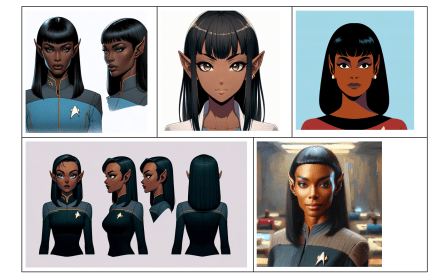
There’s plenty of room for experimentation here. Depending on the flavor of your campaign, you may want to see illustrations in different styles such as “concept art”, “anime”, “star trek the animated series”, and so on. Here’s Dr. T’Vala in a number of different styles.

A few problems I haven’t been able to crack:
- It doesn’t seem to understand a lot of the Trek alien races. My main character is Bolian, and while I got a lot of blue-skinned humans with various forehead bumps, it did not know to give the Bolian the distinctive center line even though I tried to prompt many different ways to get it. Trill spots, Andorian antennae, and other races’ distinctive features are hit-or-miss as well.
- I wasn’t able to get it to make the uniforms consistent. Even when specifically asking for TNG or TOS uniforms, each character seemed to have their own unique uniform style.
For my purposes, this was fine – I just wanted to have a mental image of each character. If I was going to publish my adventures somewhere, I would spend more time refining the image prompts and probably doing some Photoshop to get everyone into the same uniforms.
Using GPT-4 in this way has really enhanced my gaming experience – letting me quickly generate characters for my main character to interact with and giving them enough detail that I have a good idea who they are. When I run into another ship, boom, I instantly know the name of the captain or any other crew member my crew needs to interact with.
I would love to hear about improvements to these prompts, or other successful approaches people are taking.
Thank you for reading, LLAP!
TM & © 2026 CBS Studios Inc. © 2026 Paramount Pictures Corp. STAR TREK and related marks and logos are trademarks of CBS Studios Inc. All Rights Reserved.


Leave a Reply to Mike YaculloCancel reply